The Lower Half of the Properties Panel
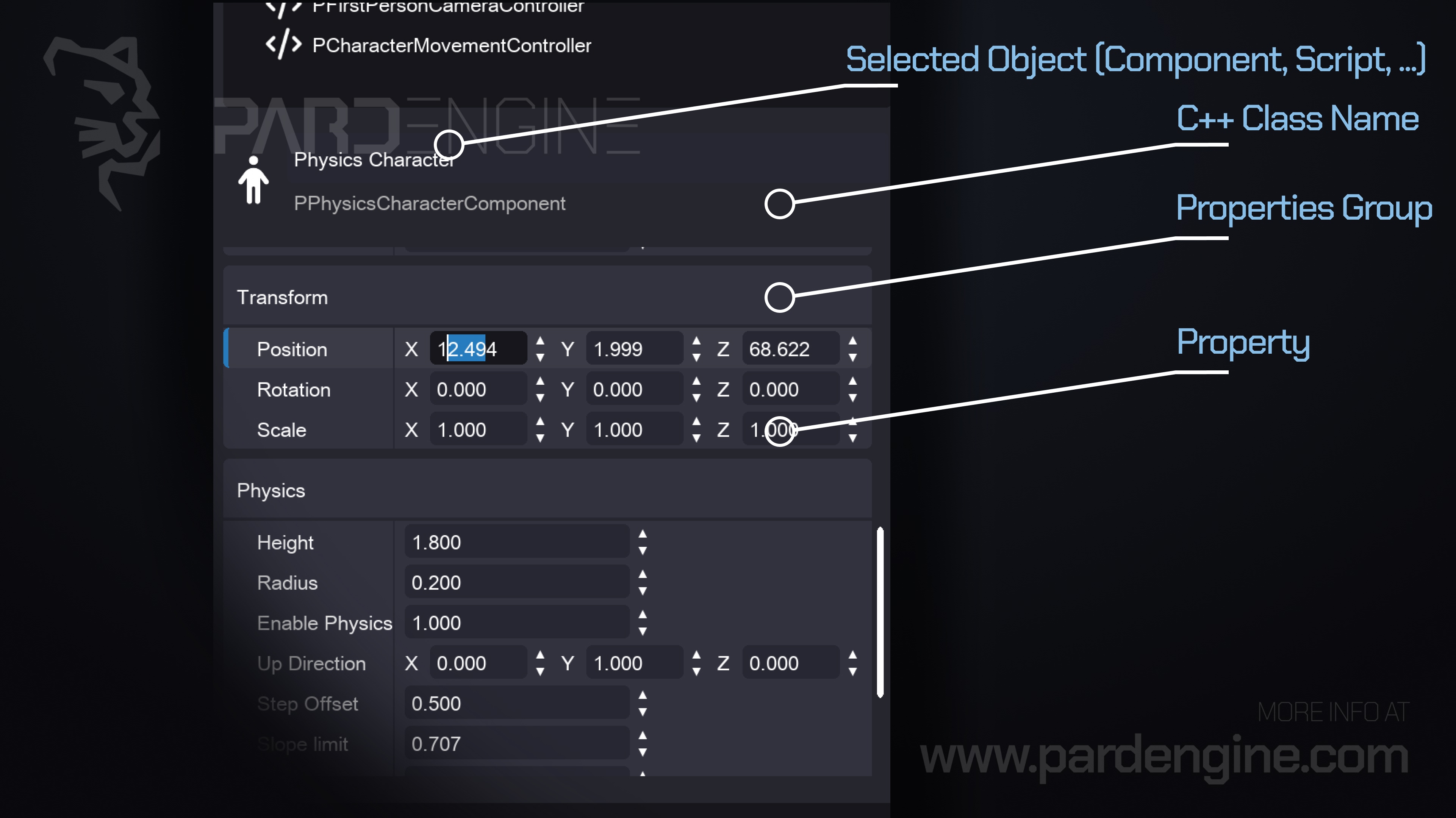
In today’s update, we’re diving into the bottom section of the Properties Panel. While the top section highlights your currently selected object (like components, scripts, and more), the lower section dynamically renders its editable properties.
Object Info Panel
Directly at the top of this section sits a compact metadata panel that displays:
The object’s name
Its underlying C++ class name
Example: In the accompanying image, the selected object is a Physics Character component, backed by the C++ class PPhysicsCharacterComponent.
The Accordion UI Control
Beneath the info panel lies the Accordion, the core interface for inspecting and modifying the selected object’s properties.
An accordion presents a vertical stack of expandable headers. Clicking a header reveals its contents, implementing progressive disclosure to keep the interface clean.
Property Groups & Rows
Each accordion header corresponds to a property group, which typically represents a specific subclass or functional layer of the selected object. For example:
Transform Group: Exposes standard spatial attributes (position, rotation, scale).
Physics Group: Unlocks physics-related settings for the component.
Within each group, every row represents an individual property or attribute. Each row features:
A resizable property name on the left
An interactive editor on the right
The editor automatically adapts to the property’s data type:
String → Text input field
Float, Int, Numeric → Spinbox with value stepping
Other types → Context-aware controls (checkboxes, dropdowns, etc.)
Under the Hood: The C++ Reflection System
Pard Engine Studio powers this dynamic property interface through the Pard Engine's C++ Reflection System. Instead of hardcoding UI controls, the editor extracts type metadata at runtime and generates interfaces on the fly.
A reflection system in C++ enables a program to inspect and interact with types and objects during execution. It typically provides:
Type Inspection: Identify classes, structs, enums, and inheritance chains at runtime.
Member Inspection: Expose field names, data types, and current values.
Runtime Manipulation: Safely modify member variables and invoke methods dynamically.
Dynamic Instantiation: Create type instances on demand based on runtime data.
In short, reflection bridges C++’s compile-time type safety with the editor’s need for runtime flexibility, enabling truly data-driven tooling.
What's next
In our next devlog, we’ll introduce the Create Item panel, a cornerstone of the Scene Editor. We’ll walk through how it displays all registered components and scripts, and how it enables rapid, drag-and-drop item & component instantiation directly into your scene.
Thank you for being part of the Pard Engine journey!
We’re closing in on our Alpha version release, and your interest fuels every line of code we write.
How you can help us grow:
Support us on Patreon: Every contribution powers our development, no matter the amount.
Patreon LinkJoin our Discord: Chat with devs, share ideas, and get early updates.
Discord LinkReady to spread the word?
Share this article anywhere you like using the buttons in the share bar.
We can’t wait to dive into the next devlog with you!