Introducing the Properties Panel
In today’s devlog, we’re unveiling the Properties Panel, a core feature of the Pard Engine scene editor. This panel allows developers to inspect, edit, and manage the properties of any selected element in the Scene Inspector. You can tweak settings for Scenes, Layers, and Items all in one place.
Today, we’ll focus on Items and the components that make them up.
What Are Items?
In Pard Engine, Items are the fundamental building blocks of every scene. They represent in-world objects and are built from a flexible hierarchy of:
Components
Scripts
Optional child Items
Components: Modular & Hierarchical
Components define an Item’s functional capabilities. Think of them as lightweight, reusable feature modules that can be combined to create anything from simple props to complex archetypes.
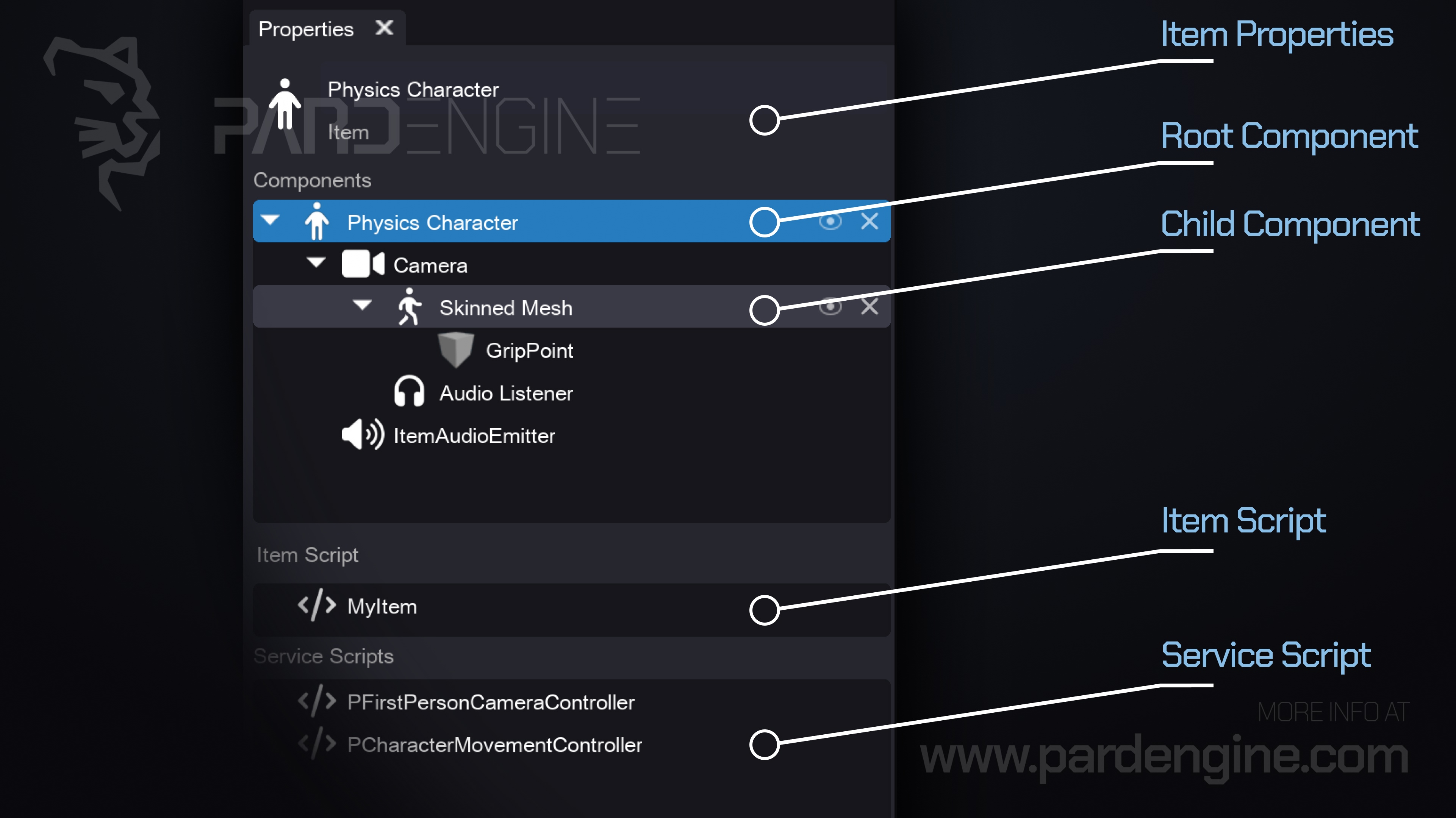
Root Component: Every Item starts with a root component that defines its primary purpose. In the example above, it’s a Physics Character component, which provides a ready-to-use physics-driven character controller.
Child Components: Additional functionality can be added hierarchically. For example, you can attach a Camera, Skinned Mesh, Audio Listener, or Audio Emitter as child components.
Example: The image above shows an animated character Item configured with:
A Physics Character root for movement & collision
A follow-camera component that tracks the character’s position
An Audio Listener to hear environmental sounds
An Audio Emitter to generate character-specific sounds like footsteps and voice
Scripts: Custom Logic Made Simple
Scripts in Pard Engine are lightweight, runtime-executable modules that attach to Items to add custom behavior. They’re designed to be:
Modular & reusable
Dynamically loaded/unloaded at runtime
Cleanly decoupled from Item data structures
Currently, scripts can be written in C++ for native performance, with plans to support additional languages in the future. We’re already supporting several distinct script types tailored to specific gameplay and engine needs.
What’s Next?
In our next devlog, we’ll dive deep into Pard Engine’s property system.
Thank you for being part of the Pard Engine journey!
We’re closing in on our Alpha version release, and your interest fuels every line of code we write.
How you can help us grow:
Support us on Patreon: Every contribution powers our development, no matter the amount.
Patreon LinkJoin our Discord: Chat with devs, share ideas, and get early updates.
Discord LinkReady to spread the word?
Share this article anywhere you like using the buttons in the share bar.
We can’t wait to dive into the next devlog with you!