Hello everyone!
Today, we’re diving into the Resource Browser, the central hub that ties every stage of asset management together.
The Resource Browser
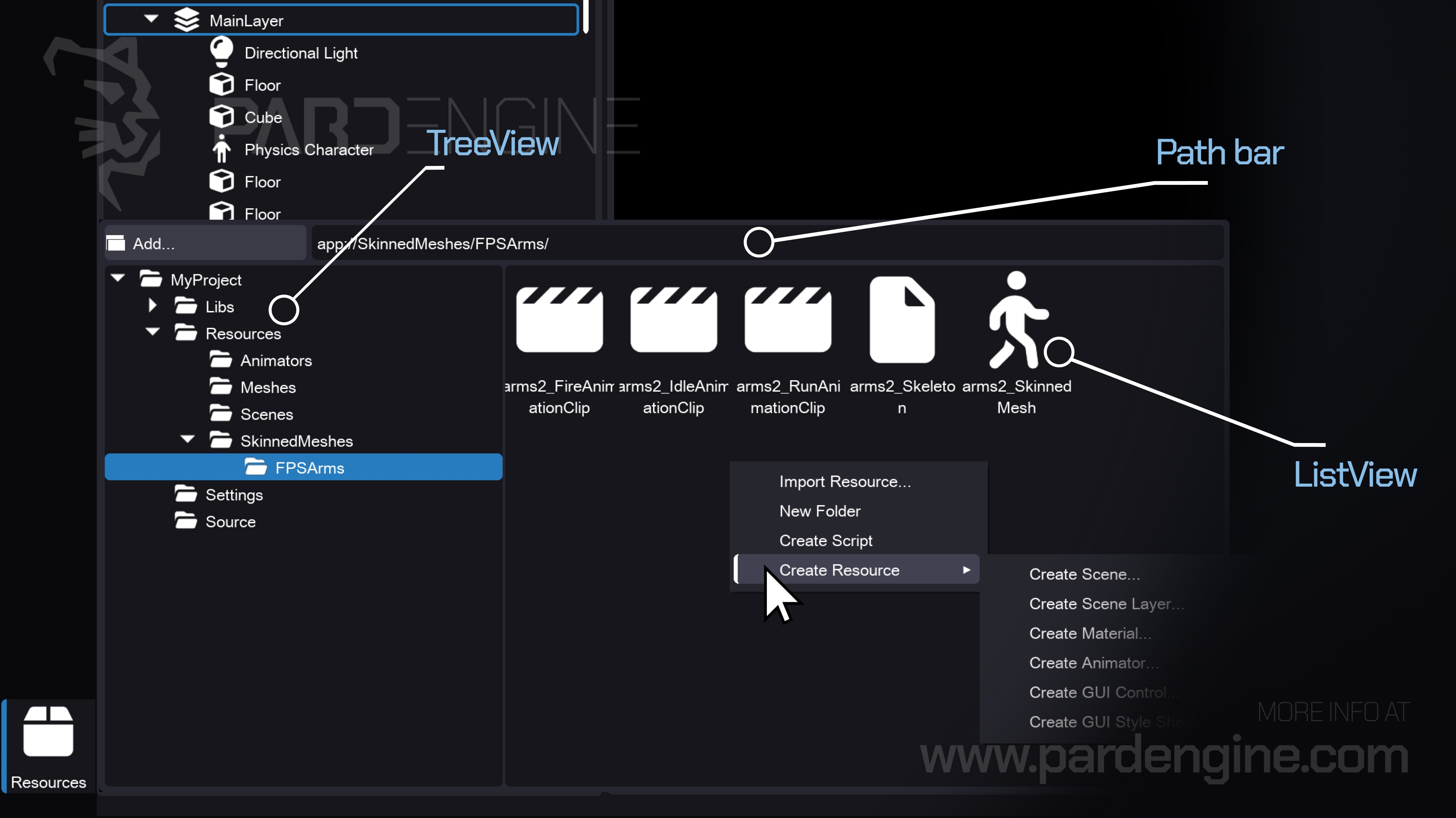
The Resource Browser serves as the core asset management interface in Pard Engine Studio. Accessible via the Resources button in the bottom-left corner of any workspace window, it maintains independent navigation state across all workspaces. This design ensures seamless context switching without breaking workflow continuity.
Interface & Navigation
The window is divided into two synchronized panels:
Tree View (Left): Mirrors the project’s on-disk directory structure, supporting nested folders and live directory updates
List View (Right): Dynamically populates based on selection, displaying subdirectories, resources, and imported assets
Both panels support drag-and-drop reorganization, inline renaming, and context menus tailored to each resource type.
Creation & Import Pipeline
New assets are generated directly within the browser. Right-click a directory, select Create Resource, choose a type, and confirm. The engine writes a .peres file containing the serialized source data, automatically tracks it, and makes it available for immediate reference or editing.
Importing external files follows a structured conversion pipeline:
Select Import Resource and load external files (FBX, GLTF, PNG, WAV, HDR, etc.)
Pard Engine routes each file to its corresponding dedicated importer
The importer parses the external file and constructs the final resource
A native .peres resource file is generated in the target directory
Source vs. Compiled Data
Every resource is logically split into two distinct layers.
The Source Part preserves raw, intermediate, and authoring-ready data in .peres files, ensuring data stability and enabling high-level editing.
The Compiled Part holds optimized and backend-specific binaries, like compressed GPU textures, packed vertex buffers, and compiled shader bytecode, stored in the project’s Cache folder.
If a resource is not already cached, it is compiled directly from the Source Part to generate the Compiled Part every time it is required by engine objects, such as components or other resources.
This separation allows:
Bridging content authoring with performance-optimized execution, keeping source data fully editable while delivering GPU-ready assets on demand.
Maintaining cross-version stability across the Pard Engine and its subsystems
Reference Resolution & File Operations
Standard file operations are tightly integrated with the engine’s dependency system.
Because every resource is identified by a globally unique internal GUID rather than its file path or name, moving, renaming, or deleting assets automatically resolves dependencies behind the scenes.
This GUID-based tracking ensures that all cross-references remain valid, eliminating the need for manual updates or complex path-resolution logic.
A resource registry automatically updates dependent connections whenever files are reorganized.
What’s Next
In our upcoming devlog, we will introduce the Viewport, the primary 3D visualization canvas in the Scene Editor. We will also discuss about the underlying graphics engine architecture and rendering pipeline.
Thank you for being part of the Pard Engine journey!
We’re closing in on our Alpha version release, and your interest fuels every line of code we write.
How you can help us grow:
Support us on Patreon: Every contribution powers our development, no matter the amount.
Patreon LinkJoin our Discord: Chat with devs, share ideas, and get early updates.
Discord LinkReady to spread the word?
Share this article anywhere you like using the buttons in the share bar.
We can’t wait to dive into the next devlog with you!