The Create Item Panel
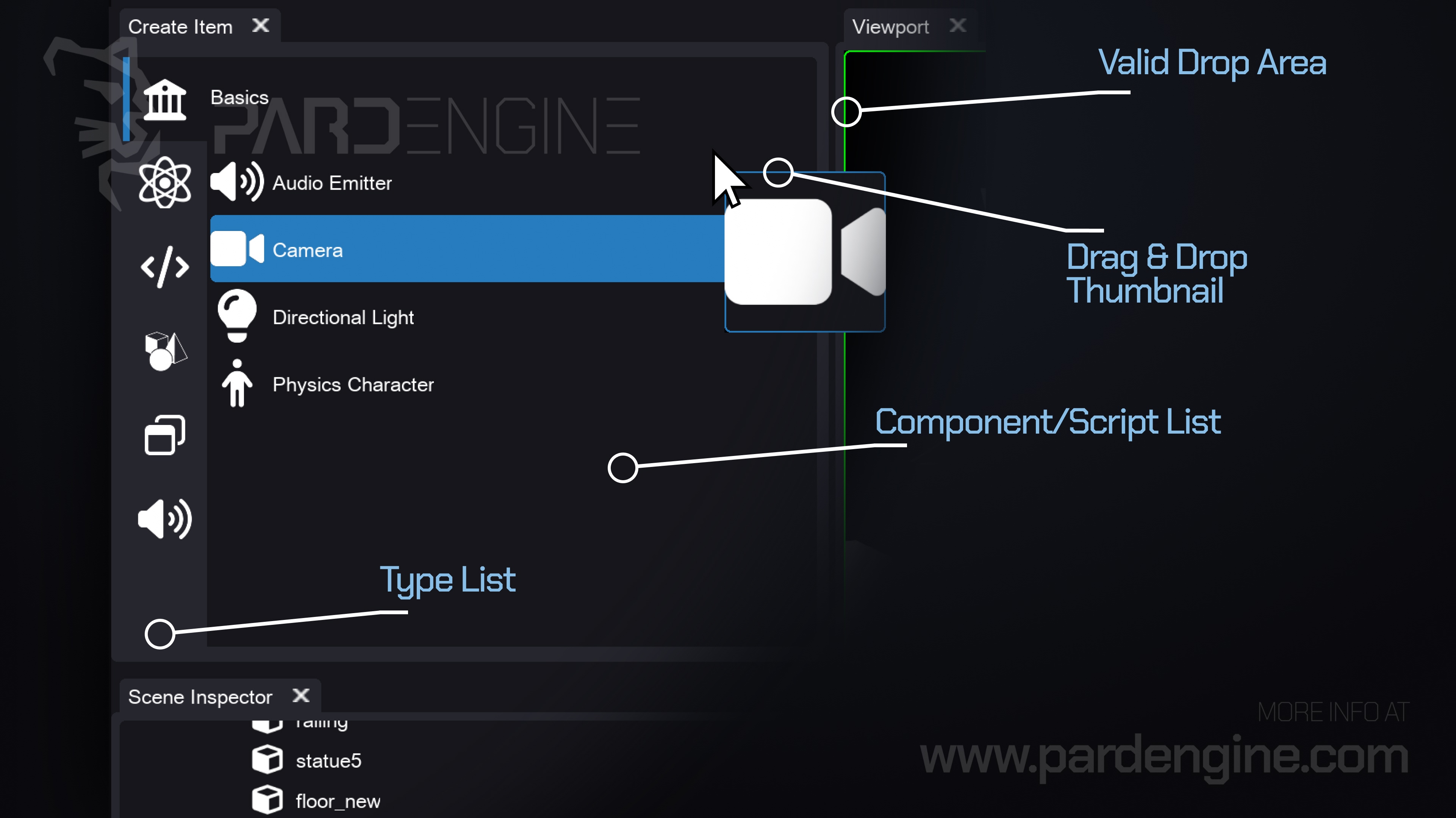
We’re excited to introduce the Create Item panel, a new feature in the Scene Editor designed to streamline our workflow. This panel gives us instant access to every registered component and script, allowing us to quickly inspect and spawn new scene items with drag-and-drop ease.
How It Works
Drag & Drop Feedback: Grab any component or script from the list. A thumbnail follows our cursor, and valid drop areas highlight in green for clear visual guidance, like in the image above.
Instant Spawning: Release the item over a valid area (like the viewport). A new scene item is instantly created in the active scene layer, with the dropped component serving as its root component.
Organized Navigation: Components and scripts are grouped by type and accessed via a clean, icon-driven tab bar on the left. No more digging through long lists or remembering class names.
Under the Hood
Thanks to the C++ Reflection System we highlighted in the previous devlog, the engine automatically registers all components and scripts at compile time. The Create Item panel leverages this metadata to dynamically populate its list.
What's next
In the next devlog, we’ll dive into the Resource Browser, a universal panel accessible from every editor in Pard Engine Studio. It will give us full control over our project’s assets (meshes, materials, textures, audio, and more).
Thank you for being part of the Pard Engine journey!
We’re closing in on our Alpha version release, and your interest fuels every line of code we write.
How you can help us grow:
Support us on Patreon: Every contribution powers our development, no matter the amount.
Patreon LinkJoin our Discord: Chat with devs, share ideas, and get early updates.
Discord LinkReady to spread the word?
Share this article anywhere you like using the buttons in the share bar.
We can’t wait to dive into the next devlog with you!